
Task Manager
Stop Trying to Remember Everything
Let the system write it down, assign it to the right person, and keep track of what still needs to happen so nothing falls through the cracks.
When Everything is Stuck in Your Head


Running a business means constantly remembering things.
Follow up with a lead
Send that document
Call the client back tomorrow
Approve the next step in a project
Schedule the next meeting
Handle this…
Deal with that…
Sometimes it’s something small. Change the water filters. Remember an anniversary. Add Rid-X to the septic. So you try to just remember it all or use sticky notes. And eventually something slips…right through the cracks.
You remember it late at night. Or a few days later when a client asks about it. The pressure isn’t really the work itself. It’s the mental load of trying to remember everything. The fastest way to clear that pressure is a simple brain dump.
Write it down as a task and let the system hold it so your brain doesn’t have to.
Where This Shows Up in Your Business
Tasks show up everywhere in the day-to-day operation of a company.
You might create tasks for:
following up with leads
sending documents or proposals
client onboarding steps
project milestones
internal approvals
service reminders
customer support actions
recurring operational responsibilities
Without a real task system, these responsibilities usually live in places like:
Slack messages
text threads
sticky notes
email reminders
or someone’s tired brain
That makes it easy to miss.

The Real Problem
At a small scale, informal reminders work. You tell someone to handle something. You make a quick note in your inbox. You remember to follow up later.
But as activity increases, that process breaks. Tasks get mentioned but never written down. Ownership becomes unclear. Deadlines pass without anyone noticing.
Soon you find yourself asking questions like:
“Did we ever follow up with them?”
“Who was supposed to handle that?”
“Was that already completed?”
When tasks are disconnected from the rest of the system, accountability disappears. And you most often become the safety net, constantly checking whether things actually got done.
What the Task Manager Is
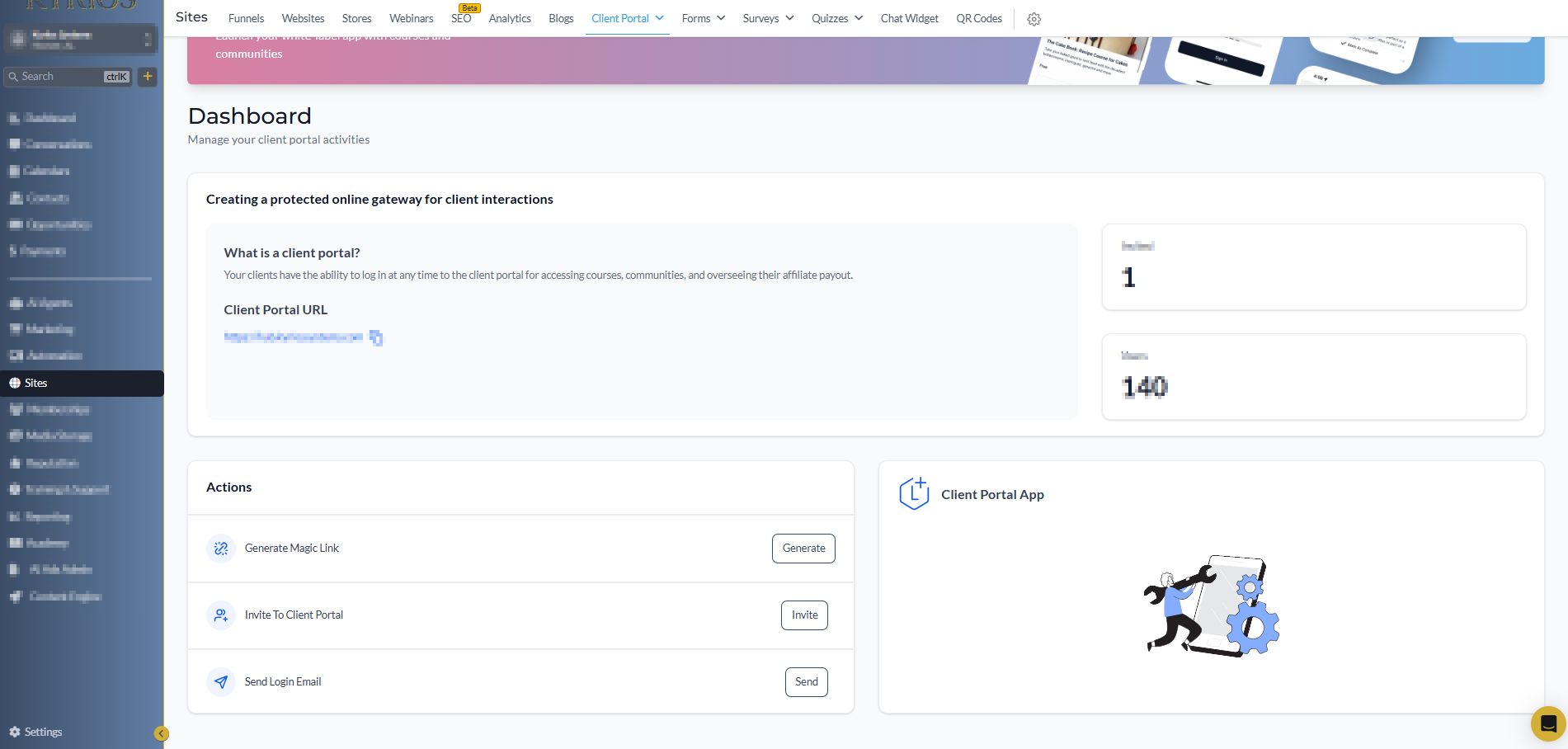
A task represents a specific piece of work or something that needs to be completed.
Each task can include:
a clear description of the work
a due date
a responsible owner
the related contact, opportunity, or process
Tasks can be created manually when something comes up, but they can also be created automatically through workflows.
When a task is created, it becomes visible in the system:
it appears in the assigned user’s task list
it shows inside the related contact, custom object, or opportunity record
it is logged in the activity timeline
Instead of floating reminders, tasks stay connected to what they belong to.
Real-World Examples
Client Onboarding
When a client signs an agreement, onboarding tasks can be created automatically. Tasks may include:
Account setup
Initial meeting scheduling
Data collection
First deliverable
Each step is assigned and tracked so onboarding moves forward smoothly.
Recurring Operational Tasks
Some responsibilities are recurring…every week, month, etc. Instead of trying to remember them, the system can create them automatically.
For example: A business might schedule recurring tasks to review financial reports, check service equipment, or update client records. Once configured, the system continues creating and assigning those tasks on schedule.
Follow-Up After a Sales Conversation
A prospect asks for more information. Before the call ends, a task is created to follow up in three days. The system keeps the reminder visible so the opportunity doesn’t go cold.
Automated Project Workflows
Tasks can also be generated automatically inside larger workflows.
For example, inside our own Kyrios content fulfillment system:
When a client signs up for the Mastery plan, a workflow begins that manages the monthly content process.
The system creates tasks such as:
Keyword research
Competitor content review
Outline creation and approval
Content writing and image creation
Publishing the article
Sending the client the final link
Each step appears as a task when it is supposed to then it starts again the next month automatically.
No one has to remember the process. The system handles it so we can focus on quality, not steps.
How Tasks Work Inside Kyrios
Tasks are deeply connected to the rest of the platform. They can be created from:
contact records
pipeline stages
workflow automation
recurring schedules
Once created, tasks can be filtered and managed by:
assigned user
due date
completion status
related contact, custom object, or opportunity
When a task is completed:
the system records the activity
workflows can move forward
pipelines can advance stages
dashboards can reflect the updated work
Because tasks connect directly to contacts, pipelines, and workflows, they represent real activity inside the system.
How Task Manager Connects to the Rest of Kyrios
Task Manager works alongside other core parts of the platform.
Pipelines show where something is in a process.
Tasks represent the work required to move it forward.
Workflows can create and schedule tasks automatically when certain triggers happen.
Together, these pieces create a connected system where work moves through defined stages instead of depending on memory.
What Changes Once Tasks Live in the System
When tasks move out of people’s heads and into the system, several things change.
Follow-ups happen more consistently
Ownership becomes clear because every task has an assigned person
Managers can see overdue work and identify bottlenecks
Teams stop asking what still needs to be done because the task list shows the answer
And most importantly, the mental pressure decreases
You no longer try to remember dozens of reminders in your head. The system remembers them for you.


Clear Your Mind and Keep Work Moving
Kyrios was designed to reduce the operational pressure that builds as businesses grow. Task Manager plays a major role in that shift. It turns scattered reminders into visible, trackable work connected directly to the rest of the system.
Instead of relying on memory and constant follow-up, the system keeps the work moving. The goal isn’t to create more reminders. The goal is to remove the burden of remembering them. When tasks are in the system, your team can see what needs to happen and who owns it. Nothing has to stay stuck in your head anymore.
(205) 736-8422
1236 Blue Ridge Blvd,
Hoover, AL 35226

Company





1236 Blue Ridge Blvd, Hoover, AL 35226
Download the Kyrios app now